A Gaussian splat viewer you can open right here.
This is a real Helios site: 100 drone photographs of a small town, rebuilt in 3D. Tap the button, then drag to look around. It opens on the textured 3D model; pick Fly-through in the layer menu at the top of the viewer for the Gaussian splat. Nothing to install and no login.
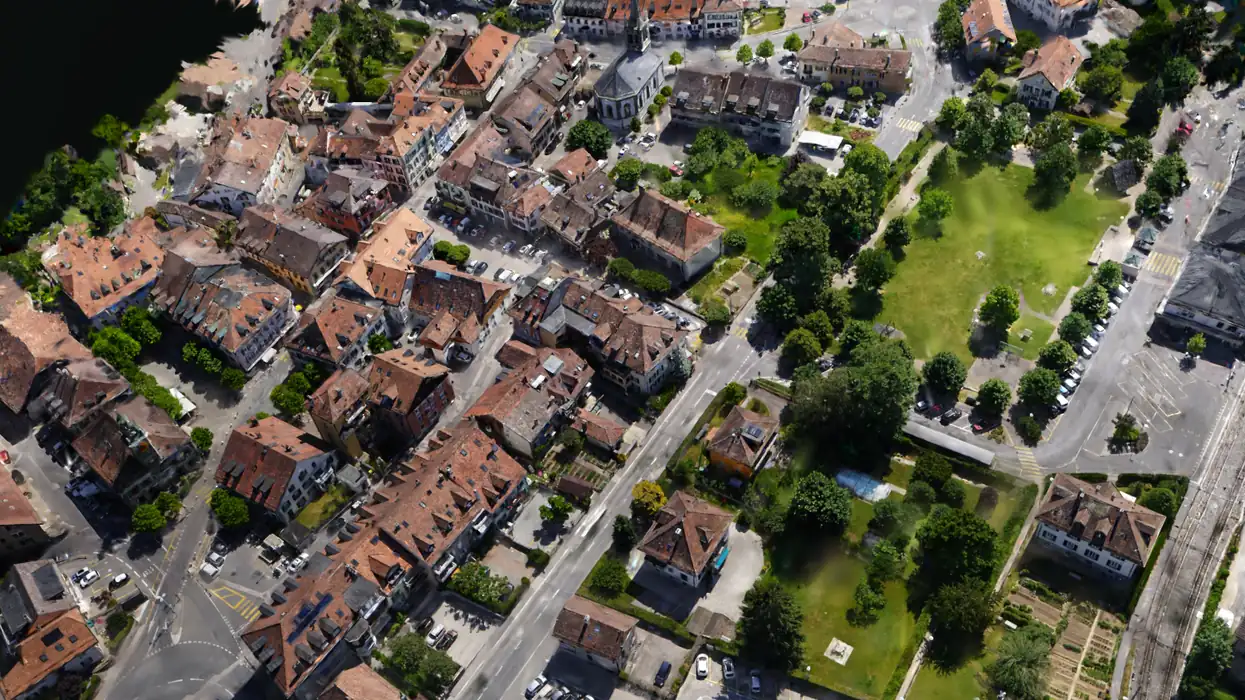
The 3D scene loads when you tap, so this page stays light.
Sample photographs: Courtesy of Pix4D / pix4d.com
Open it full screen in a new tab, or keep reading for how to move around.
One flight over a town, rebuilt in 3D.
The photographs are the PIX4Dmatic 100 image example dataset (senseFly, AeriaX), 100 overlapping frames over a small town. Helios solved where every camera stood, rebuilt the town in 3D, and trained a Gaussian splat on the result: a scene made of a very large number of small, soft, coloured blobs that blend into a photoreal view from any angle you pick. Everything you see was reconstructed from those photographs and nothing else. The viewer holds several layers of the same town: the textured 3D model it opens on, the point cloud, the splat (called Fly-through), a photo map and a height map.
Drag to look, scroll or pinch to move in.
Mouse and keyboard
- Dragorbit around the scene
- Scrollzoom in and out
- Right-dragmove the view sideways
- Double-clickfocus on that spot
Touch
- Dragorbit around the scene
- Pinchzoom in and out
- Two fingerspan the view
Layers and view buttons
- Layerstop of the viewer: 3D model, point cloud, Fly-through (the splat), photo map, height map
- Reset view, Topon a computer: back to the opening view, or look straight down
- Orbit, Fly, Walkon a computer: pick how you move; W A S D moves you in Fly and Walk, drag to look, V to switch mode
- Fit, Top, Orbit, Snapshot, Fullon a phone
The splat is for looking. The other outputs are for measuring.
A Gaussian splat is photoreal and it is the best thing to put in front of someone who was never on site, but it is a picture of the scene and not a surface. Nothing on it is measurable. Distances, areas and volumes are taken on the outputs that carry real geometry, which come from the same flight.
| Output | Format | What it is for | Measurable |
|---|---|---|---|
| Gaussian splat | KSPLAT | The scene you fly through in a browser, free on smaller flights. Photoreal, and never measurable. | no |
| Dense point cloud | LAZ | Millions of 3D points. Distances, areas and volumes are taken on this. | yes |
| Textured mesh | OBJ / GLB / PLY | A continuous surface with the photographs on it, for measurement, CAD and viewers. | yes |
| Digital surface model | GeoTIFF | Height at every pixel. Contours, slopes, cut and fill. | yes |
How a stockpile volume is taken on those outputs is on the stockpile volume measurement page, and how photographs become geometry is on the photogrammetry services page.
Asked before you ask.
What is a Gaussian splat?
A Gaussian splat is a 3D scene made of a very large number of small, soft, coloured blobs that blend together into a photoreal image from any angle you choose. It is trained from ordinary overlapping photographs, such as a drone flight. It looks like the place, which is why it is good for showing people a site, but it is a picture of the scene and not a measured surface.
Do I need to install anything to use this splat viewer?
No. The viewer opens in a normal browser tab on a computer, phone or tablet, with no plugin and no login. The 3D scene only starts loading when you tap the button, so this page stays light until you ask for it. On a phone the viewer asks once more before it downloads the large 3D layer (about 100 MB), so it never spends your mobile data without a second tap.
How do I move around in the viewer?
On a computer, drag to orbit, scroll to zoom, right-drag to move and double-click to focus on a spot. On a touch screen, drag to orbit, pinch to zoom and use two fingers to pan. On a computer the buttons reset the view, look straight down, and switch between orbit, fly and walk; in fly and walk mode W A S D moves you and dragging looks around. On a phone the buttons are Fit, Top, Orbit, Snapshot and Full.
Why does the viewer open on a 3D model and not the splat?
A shared Helios link opens on the textured 3D model first. The Gaussian splat is the layer called Fly-through in the layer menu at the top of the viewer. It is the larger download, so it loads when you pick it. The same menu switches to the point cloud, the photo map and the height map of the same town.
Can I measure distances or volumes on a Gaussian splat?
No. A splat is photoreal but it is not a surface, so nothing on it is measurable. In Helios, measurements are taken on the point cloud, the textured mesh and the digital surface model that come from the same flight. The splat is there to fly through and to show people.
Can I put a viewer like this on my own website?
Yes. Every shared Helios site has a client link that opens in any browser with no login, and an embed code you paste into your page as an iframe. You choose whether the link lives for 7, 30 or 90 days, and the embed stops working when the link is revoked or expires.
Whose photographs are in this demo?
The town is built from the PIX4Dmatic 100 image example dataset (senseFly, AeriaX), published by Pix4D. Helios ran its own reconstruction on those photographs. Courtesy of Pix4D / pix4d.com
How do I get my own site into the viewer?
Create a Helios account, upload the overlapping photographs from your drone flight, and the app shows the fixed quote before anything is processed. When the run is delivered the scene opens in the same browser, and you can share it with a link.
The same flight, other jobs.
Fly the pile, take the volume off the point cloud and the surface model.
ClusterPhotogrammetry servicesHow photographs become geometry, and where that geometry stops being trustworthy.
ClusterDrone site surveyThe general case: one flight, a measurable 3D record of the whole site.
Fly your own site in a few minutes.
Create an account, upload the photographs and the fixed quote is on screen before anything runs. An account is free and needs no card.
Create an account Email us[email protected] · Eyona Software Development (Pty) Ltd, Cape Town · Helios runs at portal.helios3d.co.za